
Last updated on
Nov 6, 2026
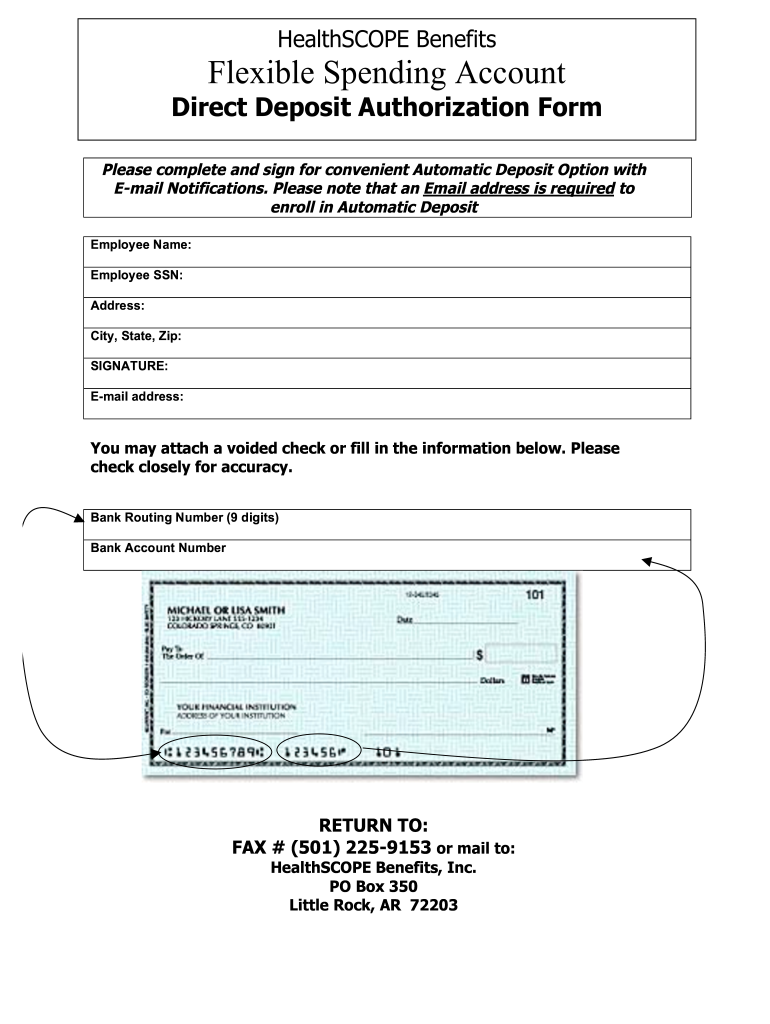
HealthSCOPE Benefits Direct Deposit Authorization Form free printable template
pdfFiller is not affiliated with any government organization

Fill out
Complete the form online in a simple drag-and-drop editor.

eSign
Add your legally binding signature or send the form for signing.

Share
Share the form via a link, letting anyone fill it out from any device.

Export
Download, print, email, or move the form to your cloud storage.
Why pdfFiller is the best tool for your documents and forms


End-to-end document management
From editing and signing to collaboration and tracking, pdfFiller has everything you need to get your documents done quickly and efficiently.
Accessible from anywhere
pdfFiller is fully cloud-based. This means you can edit, sign, and share documents from anywhere using your computer, smartphone, or tablet.
Secure and compliant
pdfFiller lets you securely manage documents following global laws like ESIGN, CCPA, and GDPR. It's also HIPAA and SOC 2 compliant.
What is HealthSCOPE Benefits Direct Deposit Authorization Form
The HealthSCOPE Benefits Direct Deposit Authorization Form is a document used by employees to set up automatic deposits for their flexible spending accounts.
pdfFiller scores top ratings on review platforms




Had some trouble with billing and the customer service was right on it and took care of the problem. Software is good and being able to access various pre-made docs is very nice.
This is great so far. Its easy to navigate---very user friendly.
Who needs HealthSCOPE Benefits Direct Deposit Authorization Form?
Explore how professionals across industries use pdfFiller.

HealthSCOPE Benefits Direct Deposit Authorization Form is needed by:
-
Employees of HealthSCOPE Benefits, Inc.
-
Individuals setting up Direct Deposits for Healthcare.
-
People managing Flexible Spending Accounts.
-
Arkansas residents needing Direct Deposit Authorization.
-
HR departments requiring employee financial information.
-
Payroll departments processing direct deposit requests.
Comprehensive Guide to HealthSCOPE Benefits Direct Deposit Authorization Form
What is the HealthSCOPE Benefits Direct Deposit Authorization Form?
The HealthSCOPE Benefits Direct Deposit Authorization Form enables employees to set up automatic deposits for their flexible spending accounts. This essential document requires specific details, including the employee's name, Social Security Number (SSN), address, email, and detailed bank information. Signing and submitting the form to HealthSCOPE Benefits, Inc. is crucial for processing direct deposits seamlessly.
Purpose and Benefits of the HealthSCOPE Benefits Direct Deposit Authorization Form
This form simplifies the process of managing healthcare finances by offering several advantages. Direct deposit streamlines the funding of flexible spending accounts, enhancing convenience and efficiency. Employees can enjoy faster access to their funds without the delays associated with paper checks.
Eligibility Criteria for the HealthSCOPE Benefits Direct Deposit Authorization Form
To qualify for the HealthSCOPE Benefits Direct Deposit Authorization Form, applicants must be employees of HealthSCOPE. Arkansas residents should also be aware of state-specific guidelines when completing their applications. It is essential to confirm eligibility before attempting to fill out the form.
How to Fill Out the HealthSCOPE Benefits Direct Deposit Authorization Form Online
Filling out the HealthSCOPE Benefits Direct Deposit Authorization Form online is simple with pdfFiller. Follow these steps to ensure accuracy:
-
Open the form in pdfFiller.
-
Enter your Employee Name and SSN in the required fields.
-
Provide your bank's Routing Number and Account Number accurately.
-
Add your address, email, and other necessary information.
-
Review the completed fields to confirm accuracy before submission.
Common Mistakes and How to Avoid Them
When filling out the form, employees often make common errors. Here’s a checklist to help avoid these mistakes:
-
Double-check your SSN and bank details for accuracy.
-
Ensure all required fields are filled completely.
-
Validate your signature before submitting the form.
Submission Methods for the HealthSCOPE Benefits Direct Deposit Authorization Form
Completed forms can be submitted through various methods. Employees can choose to submit the form online or send it by mail. Those returning the form in person should send it to the HealthSCOPE Benefits office located in Little Rock, Arkansas. Be aware of the timelines for submission and the next steps after submission.
Post-Submission Process: What to Expect
After submitting the HealthSCOPE Benefits Direct Deposit Authorization Form, employees will enter a processing phase. Expect confirmation about the status of the application, allowing for follow-ups if needed. The processing time can vary, and successful submissions lead to the activation of direct deposit services.
Security and Compliance When Using the HealthSCOPE Benefits Direct Deposit Authorization Form
Using pdfFiller provides security features for filling out sensitive documents, ensuring compliance with HIPAA and GDPR regulations. Users benefit from secure online storage and sharing options for their completed forms, safeguarding personal data during the submission process.
How pdfFiller Can Help You with Your HealthSCOPE Benefits Direct Deposit Authorization Form
pdfFiller streamlines the process of filling out the HealthSCOPE Benefits Direct Deposit Authorization Form. The platform allows for easy editing and filling of forms, enabling eSigning without the need for printing. This cloud-based solution enhances document management efficiency while maintaining security.
Get Started with Your HealthSCOPE Benefits Direct Deposit Authorization Form Today!
Utilize pdfFiller for an effective and user-friendly form-filling experience. The platform's features simplify submission, empowering users to manage their healthcare finances effectively. Access the HealthSCOPE Benefits Direct Deposit Authorization Form and start today!
How to fill out the HealthSCOPE Benefits Direct Deposit Authorization Form
-
1.To access the HealthSCOPE Benefits Direct Deposit Authorization Form on pdfFiller, visit pdfFiller's website and use the search bar to find the form by its name.
-
2.Once the form is open, use the navigation tools provided by pdfFiller to scroll through the document and identify fillable fields.
-
3.Before filling out the form, gather essential information such as your full name, Social Security Number (SSN), address, email, and bank account details including routing and account numbers.
-
4.In the provided fields, enter your Employee Name, SSN, and Address accurately, ensuring all required fields are filled without missing information.
-
5.Next, fill in your email address and the banking information required. Enter the Bank Routing Number and Bank Account Number carefully to avoid errors.
-
6.After completing all fields, review the entire form for accuracy. Ensure your SSN, address and banking details are correct as this information is critical for processing.
-
7.Locate the signature line and use pdfFiller's e-signature tools to sign the document electronically, confirming your request for direct deposit.
-
8.Once everything has been checked and signed, proceed to save your changes. Use the save function on pdfFiller to ensure your filled document is stored.
-
9.You can choose to download your completed form in your preferred format or submit it directly through pdfFiller, following the on-screen instructions for final submission.

Who is eligible to use the HealthSCOPE Benefits Direct Deposit Authorization Form?
Employees who are enrolled in HealthSCOPE Benefits and wish to set up direct deposits for their flexible spending accounts are eligible to use this form.
What information do I need to gather before completing this form?
Before starting, collect your full name, Social Security Number (SSN), home address, email address, and complete bank account details including routing and account numbers.
How do I submit the completed form?
Completed forms can be submitted directly through pdfFiller or printed and sent to HealthSCOPE Benefits, Inc. in Little Rock, Arkansas. Ensure you follow the submission instructions provided on the platform.
Are there any common mistakes to avoid while filling out this form?
Common mistakes include entering incorrect banking details, forgetting to sign the form, or omitting required fields. Double-check all entries for accuracy before submission.
What happens after I submit the HealthSCOPE Benefits Direct Deposit Authorization Form?
After submission, the form will be processed by HealthSCOPE Benefits. You can expect confirmation of your direct deposit setup, which may take a few business days.
Related Content
Related Forms




Related Catalogs
Get the latest insights from our blog


If you believe that this page should be taken down, please follow our DMCA take down process
here
.
This form may include fields for payment information. Data entered in these fields is not covered by PCI DSS compliance.